

We may earn a commission if you buy through links on this page. This site is not owned by QuickBooks.
Last verified 19 October 2026 by Roshan Jha. Method: checked against quickbooks.intuit.com/pricing. We did not complete a paid checkout.
Related: Current QuickBooks coupon codes. QuickBooks Pricing 2026: Every Plan, Every Add On, and What You Will Pay. QuickBooks Black Friday 2026: What Is Confirmed So Far.
This review compares all five QuickBooks Online tiers using official plan pages and docs. Hands on testing notes are pending, so no personal results are claimed. If you’re overwhelmed by the pricing page or comparing QuickBooks to other accounting options, this breakdown cuts through the confusion and shows you what each plan really offers for your business.
What QuickBooks actually is
QuickBooks is Intuit’s accounting and bookkeeping platform, and at this point it’s the default choice most small business owners in the US think of first when they hear “accounting software.” It’s not just invoicing software and it’s not just a bookkeeping ledger.
It’s built to run the financial side of a business end to end: sending invoices, tracking expenses, reconciling bank accounts, running payroll, managing inventory, filing 1099s, and now, increasingly, using AI to do a chunk of that work for you automatically.
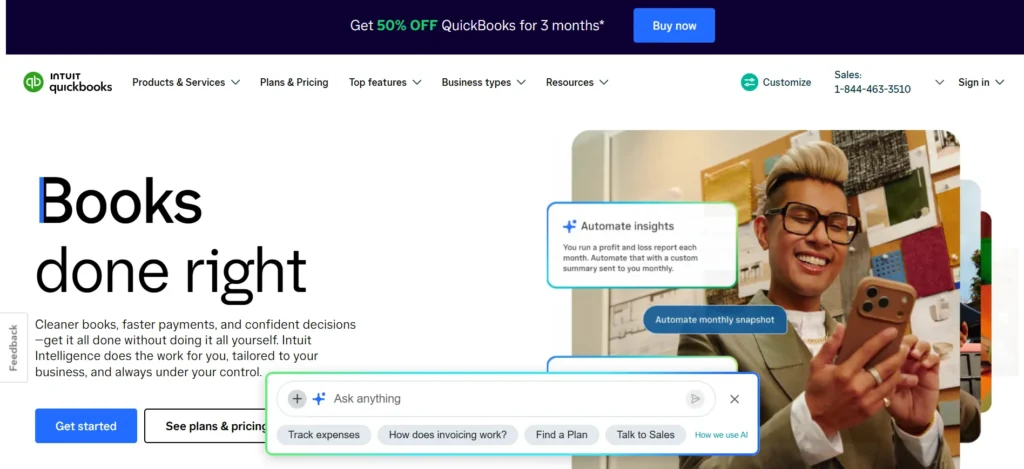
The official pages show how far Intuit has leaned into AI across the platform. They’ve branded it “Intuit Intelligence,” and it now touches four separate areas: Accounting AI, Payments AI, Finance AI, and a broader set of AI features that show up across reports, reconciliation, and cash flow forecasting.
This isn’t a bolted-on chatbot. It’s woven into the categorization engine, the reconciliation flow, and even how the platform flags anomalies in your books before you catch them yourself.
QuickBooks isn’t one product either. It splits into two clear paths depending on your business size:
- Small business plans: Free, Simple Start, Essentials, Plus, and Advanced. This is what most solo founders, freelancers, and small teams use.
- Mid-size business: Intuit Enterprise Suite, an ERP-level product built for companies that have outgrown the small business tiers and need multi-entity management, more granular permissions, and deeper operational reporting.
I’ll focus on the small business side here since that’s what the vast majority of people looking at QuickBooks actually need.
Quickbooks Features (plan by plan)
Here’s where I want to actually be useful instead of just listing feature names. Each tier isn’t just “more of the same,” it genuinely unlocks different categories of functionality, and knowing which category you need is the whole ballgame.
Free plan: genuinely free, genuinely limited
QuickBooks Free costs $0 a month and needs no credit card to start, which I appreciated. It’s built for people who need to organize their finances without committing to anything yet. It covers one user and the basics: tracking income and expenses, and simple invoicing. If you’re testing the waters before your business has real transaction volume, it’s a reasonable place to park your books for a bit.
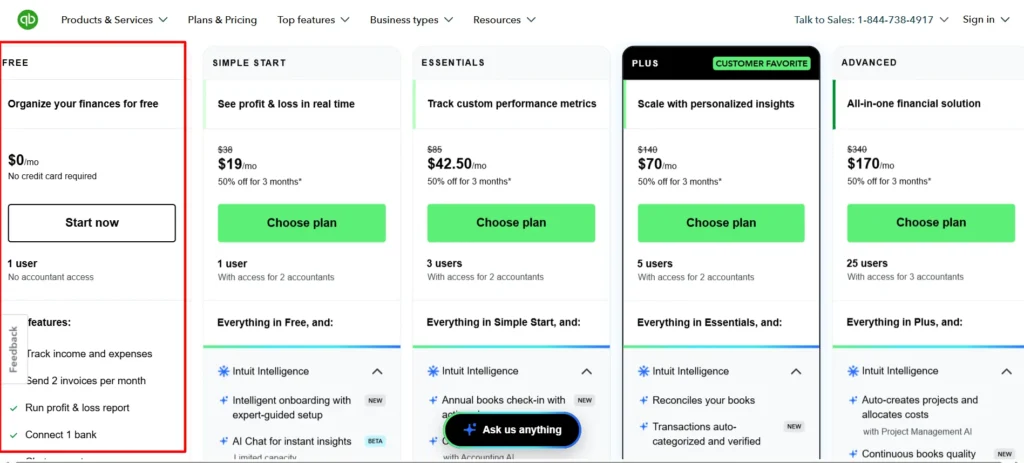
Don’t expect this to scale with you though. There’s no bill management, no reporting depth, no multi-user access. It’s a starting point, not a long-term home for a growing business.
Simple Start: the real entry point
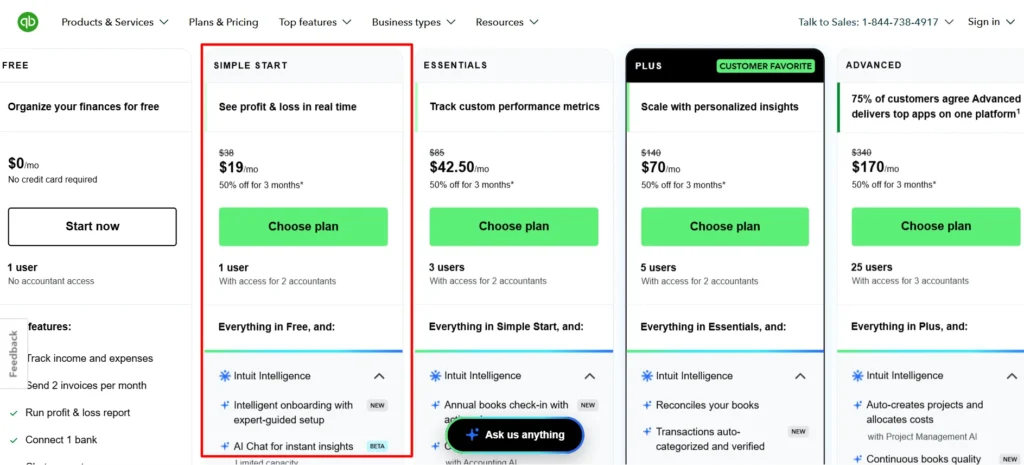
Simple Start is where most solo operators and new LLCs actually land. It gives you one user and covers:
- Invoicing and estimates
- Expense tracking
- Mileage tracking, which matters if you drive for client work
- Bill management
- Reports (basic financial statements)
- Inventory tracking at a basic level
- Project profitability tracking
- Payments (accepting customer payments directly)
- Apps and integrations with your existing tools
- Tax deductions and sales tax handling
- Direct deposit and 1099 e-filing
- Mobile time tracking
- Customer growth and customer management tools
That’s a genuinely wide feature set for a single-user plan. If you’re a freelancer or a one-person operation who wants proper books without hiring a bookkeeper, this tier alone might cover you.
Essentials: built for the first hire
Essentials keeps everything from Simple Start and adds room for a small team, up to 3 users. This is the tier I’d point most small businesses toward the moment they bring on a second person who needs to touch the books, whether that’s a part-time bookkeeper, a co-founder, or an office manager.
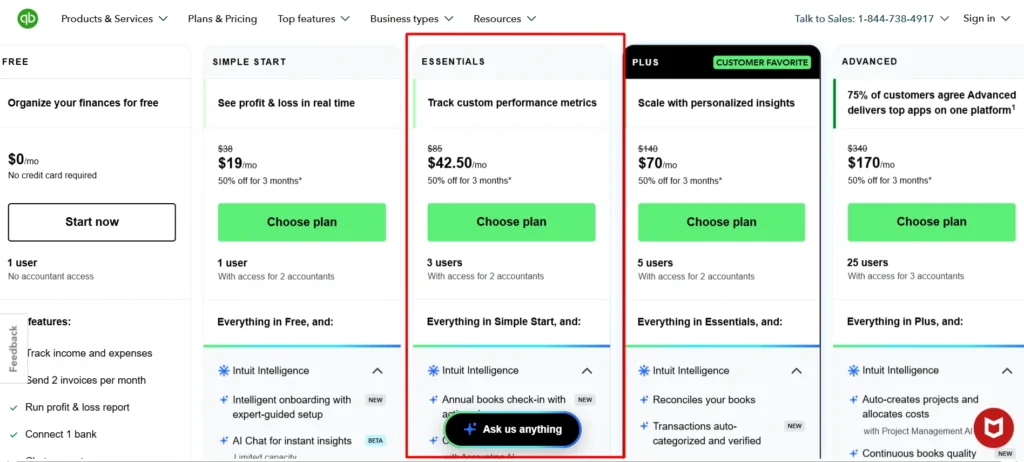
The core feature list doesn’t dramatically expand over Simple Start, but the multi-user access alone is the reason to upgrade.
Plus: the one Intuit calls their “customer favorite,” and I get why
Plus supports up to 5 users and is genuinely the tier built for businesses that are past the “just me” phase and into actual operations. On top of everything in Essentials, you get:
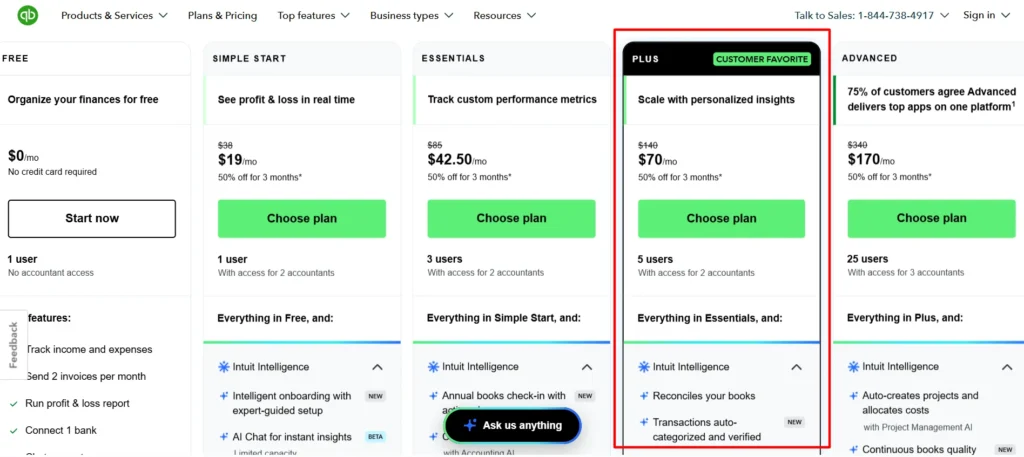
- Inventory tracking that goes deeper than the basic version
- Project profitability tracking, so you can see margins per client or per job, not just company-wide
- Budgeting tools
- More robust reporting for growth-stage decision making
Intuit markets this as scaling “with automated insights,” and having gone through it, that’s a fair description. The reporting here is meant to help you make decisions, not just record what already happened.
Advanced: for businesses that need control, not just tracking
Advanced jumps to 25 users and access for 3 accountants, and this is where QuickBooks stops being “accounting software” and starts acting more like an operations platform. Intuit’s own claim is that 70%+ of customers on this tier improve their cash flow, and the feature set backs that framing:
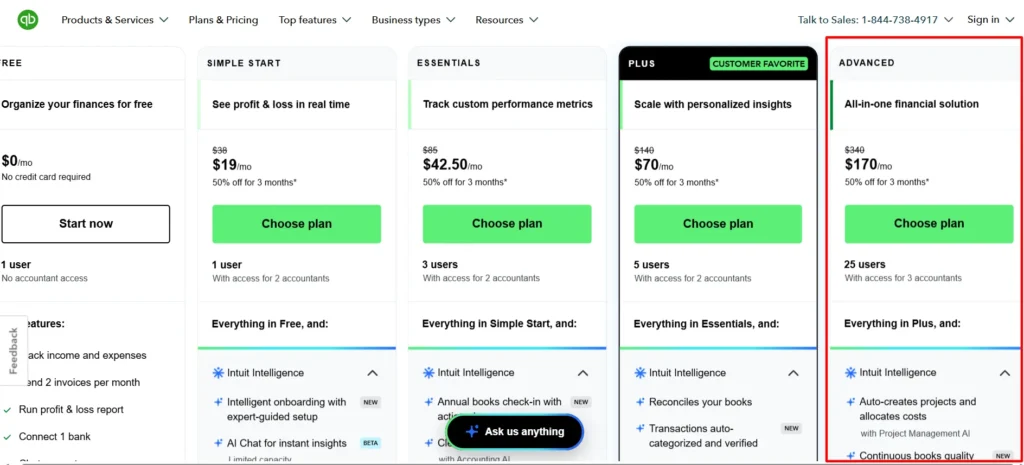
- Everything in Plus
- Full Intuit Intelligence suite: Accounting AI, Payments AI, and Finance AI all included
- Custom user permissions, so you’re not giving every team member full access by default
- Batch transactions for processing large volumes of invoices or bills at once
- Automated workflows that reduce manual data entry
- Business analytics and insights beyond standard reporting
- A dedicated account team
- Priority support
If your business runs on real volume, multiple departments touching the books, or you just want fewer manual steps in your monthly close, this is the tier that earns its price.
Intuit Enterprise Suite: when you outgrow all five tiers
This sits above Advanced entirely and isn’t priced on the standard plan page. Intuit positions it as an ERP-level solution for companies that need “operational sophistication,” which is their way of saying multi-entity consolidation, more advanced automation, and reporting built for businesses with real organizational complexity. You’d need to talk to sales for actual pricing here, since it’s clearly built for a case-by-case quote rather than a flat monthly fee.
QuickBooks Pricing in detail 2026
This is the part most reviews get lazy about, so let me be precise. QuickBooks is currently running a 50% off for 3 months promotion on every paid small business plan, and you can toggle between that offer and a 30-day free trial instead, though you can’t stack both. Here’s exactly what that means for each tier, based on the current live pricing:
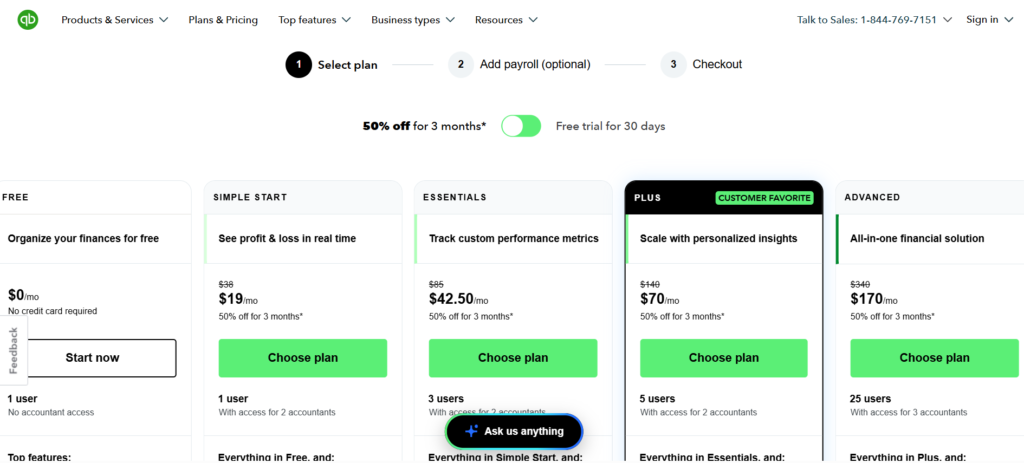
| Plan | Regular price | Promo price (first 3 months) | Users included |
| Free | $0/mo | $0/mo | 1 |
| Simple Start | $38/mo | $19/mo | 1 |
| Essentials | $85/mo | $42.50/mo | 3 |
| Plus | $140/mo | $70/mo | 5 |
| Advanced | $340/mo | $170/mo | 25 (3 accountants) |
A few honest notes on the pricing that I think matter more than the discount headline:
The 50% off only lasts 3 months
After that, you’re back to full price. Do the math on whether the tier you’re choosing is still worth it at $85, $140, or $340 a month once the promo period ends, because that’s the number that actually determines your long-term cost, not the flashy first-quarter price.
You can’t run the discount and the free trial together
The toggle on the pricing page makes this obvious once you see it: it’s either 50% off starting immediately, or 30 days free with full price kicking in afterward. If you’re not sure QuickBooks is right for you yet, the free trial is the lower-risk option even though it looks less exciting than “50% off.”
Pricing is per company file, not per user, up to the user cap
This matters if you’re comparing QuickBooks to platforms that charge per seat. A 3-person team on Essentials pays one flat fee, not three separate subscriptions, as long as you stay within that plan’s user limit.
Payroll is a separate add-on
None of the prices above include payroll. If you need to run payroll through QuickBooks, that’s billed on top of your plan, and the cost scales with your employee count. Don’t assume the sticker price above covers your full monthly bill if payroll is part of your operation.
Advanced’s jump in price is steep, but it comes with genuinely different support and automation, not just a bigger number badge
Priority support and a dedicated account team are real inclusions, not marketing filler, based on what I found researching support tiers.
Who each plan is actually suitable for
I don’t think generic “it depends on your needs” advice is useful, so here’s how I’d actually map real situations to plans:
- You’re testing an idea or just started freelancing with almost no transaction volume yet: Free plan. Don’t pay for accounting software before you have much to account for.
- You’re a solo freelancer, consultant, or single-owner LLC with real client invoicing: Simple Start. The feature list at $19/mo (promo) covers almost everything a one-person operation needs.
- You just hired your first employee, contractor, or bookkeeper who needs system access: Essentials. The 3-user cap is the whole reason to upgrade here.
- You’re running inventory, multiple active projects, or need to budget properly across a growing team: Plus. This is genuinely the tier built for a business past its first year of operation.
- You’re processing high transaction volume, have several departments touching finances, or need permission controls and automation: Advanced. The AI suite and priority support start paying for themselves at this scale.
- You’re a multi-entity company or have outgrown standard SMB accounting entirely: Intuit Enterprise Suite, and you’ll need to talk to their sales team directly for that.
Customer support: what to actually expect
Support quality varies by which plan you’re on, and I think that’s worth knowing before you commit rather than finding out mid-crisis.
For Simple Start, Essentials, and Plus customers, phone and chat support runs Monday through Friday, roughly 6am to 6pm Pacific Time, with Saturday hours from 6am to 3pm Pacific. Outside those windows, you’re relying on the in-product help articles and community forums, which are reasonably deep but obviously not the same as a live person.
Advanced subscribers get support access any day, any time, along with the dedicated account team mentioned above. If round-the-clock support access matters to your operation, that alone might justify the jump to Advanced regardless of the feature differences.
Sales, as opposed to product support, is available through the number listed directly on their pricing page if you want to talk through which plan fits before you buy, rather than after.
One honest complaint I’ll flag: live chat support on Intuit’s platforms has a mixed reputation. Some users report it defaulting to automated responses before you get routed to an actual human, which is a common frustration across a lot of SaaS support systems, not unique to QuickBooks, but worth setting expectations for going in.
Pros & Cons: QuickBooks Review
Pros
- Full accounting stack in one platform: invoicing, expenses, payroll, inventory, project tracking, and tax handling, without stitching together five separate tools
- AI features (Intuit Intelligence) are genuinely integrated into reconciliation and reporting, not a superficial add-on
- Pricing is per company file, so a small team isn’t paying per-seat once they’re within the plan’s user cap
- Free plan and 30-day trial both exist, so you can test before paying anything
- Advanced tier includes 24/7 support and a dedicated account team, which matters for businesses that can’t afford downtime in their finance operations
- Strong ecosystem of integrations and a large accountant network already trained on the platform, so finding a bookkeeper who already knows QuickBooks is easy
- Mobile app covers real functionality (mileage tracking, invoicing, time tracking), not just account viewing
Cons
- The 50% off promo is only for 3 months, and full price afterward is a real jump, especially on Essentials, Plus, and Advanced
- Payroll is billed separately on top of every plan, which can catch new users off guard when the real monthly bill lands
- Standard support hours (Simple Start through Plus) don’t cover evenings or Sundays, which is inconvenient if you do your books outside business hours
- Live chat has a reputation for routing through automated responses before reaching a real person
- The jump from Plus to Advanced is a large price increase, and smaller businesses may end up paying for automation and permission features they don’t fully use yet
- Intuit Enterprise Suite pricing isn’t published, so mid-size companies exploring that tier need to go through a sales conversation just to get a number
FAQs: QuickBooks Review
Is QuickBooks actually 50% off right now, or is that a bait-and-switch?
The 50% off is real and applies to the first 3 months on every paid small business plan. It’s not a permanent price, so budget for full price starting in month 4.
Can I use the free trial and the discount at the same time?
No. The pricing page has a toggle between the two, and you have to choose one. If you’re unsure whether QuickBooks fits your workflow, the 30-day free trial carries less risk than committing to the discounted rate right away.
Does the price include payroll?
No. Payroll is a separate add-on billed on top of your base plan, and the cost depends on how many employees you’re running payroll for.
Which plan should a small business with 2 to 3 employees choose?
Essentials is the natural starting point at that team size, since it supports up to 3 users. If you also need inventory tracking or project-level profitability, Plus is worth the jump even at a slightly smaller team size.
Is the AI in QuickBooks actually useful, or just marketing?
Based on what’s included, it’s functional rather than cosmetic. Accounting AI and Finance AI show up in reconciliation, categorization, and forecasting rather than existing as a separate chatbot feature you have to go looking for. It’s most fully available on the Advanced plan.
What happens after the 3-month discount ends?
Your subscription renews at the plan’s full list price automatically unless you cancel or downgrade before the promotional period ends. It’s worth putting a reminder on your calendar for month 3 if the higher price would change your decision.

About the author: Roshan Jha
Roshan Jha is an SEO expert focused on helping brands grow through search-first content strategy, technical SEO, and data-driven digital marketing. He specializes in building scalable organic growth systems, covering keyword research, on-page optimization, topical authority, site audits, and conversion-focused content planning. With a practical, results-oriented approach, Roshan works with businesses to improve rankings, increase qualified traffic, and turn visibility into measurable revenue. Follow Roshan Jha on LinkedIn.