

Disclosure: this page has links that may pay us a commission. This site is not owned by QuickBooks. QB Deals is run independently.
Last verified: 20 October 2026, reviewed by Roshan Jha.
What changed: A top verdict, a scorecard and a renewal warning are new. Xero plan features were rechecked today.
Quick verdict: QuickBooks for payroll and US depth, Xero for unlimited users.
QuickBooks Online suits most US small firms. Xero suits bigger teams on a budget.
Facts last verified by Roshan Jha on 20 October 2026. Method: only Intuit and Xero pages served as sources. Main source: QuickBooks pricing. Every source sits in the list at the bottom. No paid QuickBooks or Xero checkout was completed.
Choosing accounting software feels risky. Your books, taxes and payroll all live inside it. Switching later costs weekends of cleanup. And both brands push promo prices that hide the real yearly bill.
Here you will see the plain list prices side by side. You will see which tool fits your team size. You will also learn how to move data if you change your mind. That saves you a costly second switch.
Quick answer: QuickBooks Online suits most US small businesses in 2026. It has deeper tiers and bundled payroll options. Xero suits teams that want unlimited users at lower list prices. Xero Early costs $27 a month after its promo. QuickBooks Simple Start costs $38.
Before you buy, see our full QuickBooks pricing guide. It lists every plan and add on.
Before you buy, check today’s verified QuickBooks coupon offers. Related: Best Xero Alternatives: Why QuickBooks Fits. QuickBooks Review. QuickBooks vs Zoho Books: Price, Features, Verdict.
Quick verdict
- Pick QuickBooks for bundled payroll, inventory on Plus and a huge US accountant base.
- Pick Xero if you need many users. Every Xero plan includes unlimited users.
- Cheapest first year: Xero, thanks to its 6 month promo.
- Biggest team on one plan: Xero. QuickBooks Advanced stops at 25 users.
QuickBooks vs Xero at a glance
| Factor | QuickBooks Online | Xero (US) |
|---|---|---|
| Free plan | Yes, 1 user, 2 invoices a month | No |
| Entry plan | Simple Start $38 | Early $27 after promo |
| Middle plan | Essentials $85, Plus $140 | Growing $59 after promo |
| Top plan | Advanced $340 | Established $97 |
| Intro offer | 50% off for 3 months, or 30 day trial | Low promo price for 6 months on Early and Growing |
| Users | 1, 3, 5 or 25 by plan | Unlimited on every plan, per Xero |
| Payroll | Workforce bundles from $88 plus $6.50 per employee | Gusto powered add on, $36 plus $6 per person |
| App integrations | UNKNOWN count | 1000+, per Xero |
| Accountant access | 2 on most plans, 3 on Advanced | UNKNOWN |
Our verdict in plain words
Small business owners have debated this pair for years in forums and accountant groups.
The honest answer is that both are good accounting tools.
The deciding factor is rarely features. It is people and payroll.
How many people need logins? Who runs payroll? Which tool does your accountant know?
Answer those three questions and the choice usually makes itself.
What each tool is
QuickBooks Online
QuickBooks Online is Intuit’s cloud accounting product.
It runs in five tiers, from Free to Advanced.
Intuit now brands its AI features as Intuit Intelligence.
Xero
Xero is cloud accounting software with three US plans.
Its US plans are Early, Growing and Established.
Xero says every plan includes unlimited users.
Pricing compared in detail
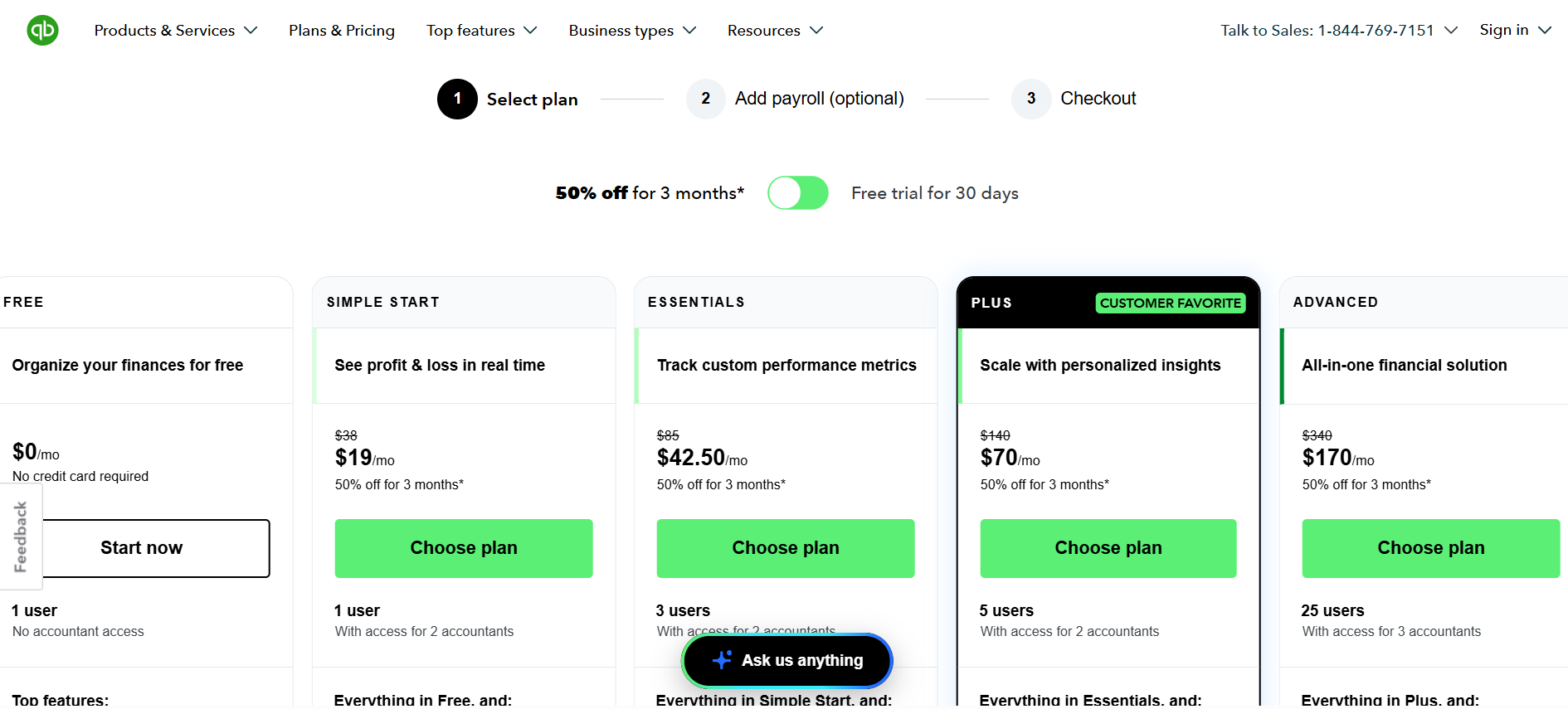
| Tier | QuickBooks list | QuickBooks first 3 months | Xero after promo |
|---|---|---|---|
| Free | $0 | $0 | None |
| Entry | $38 | $19 | $27 |
| Second | $85 | $42.50 | $59 |
| Third | $140 | $70 | $97 |
| Fourth | $340 | $170 | None |
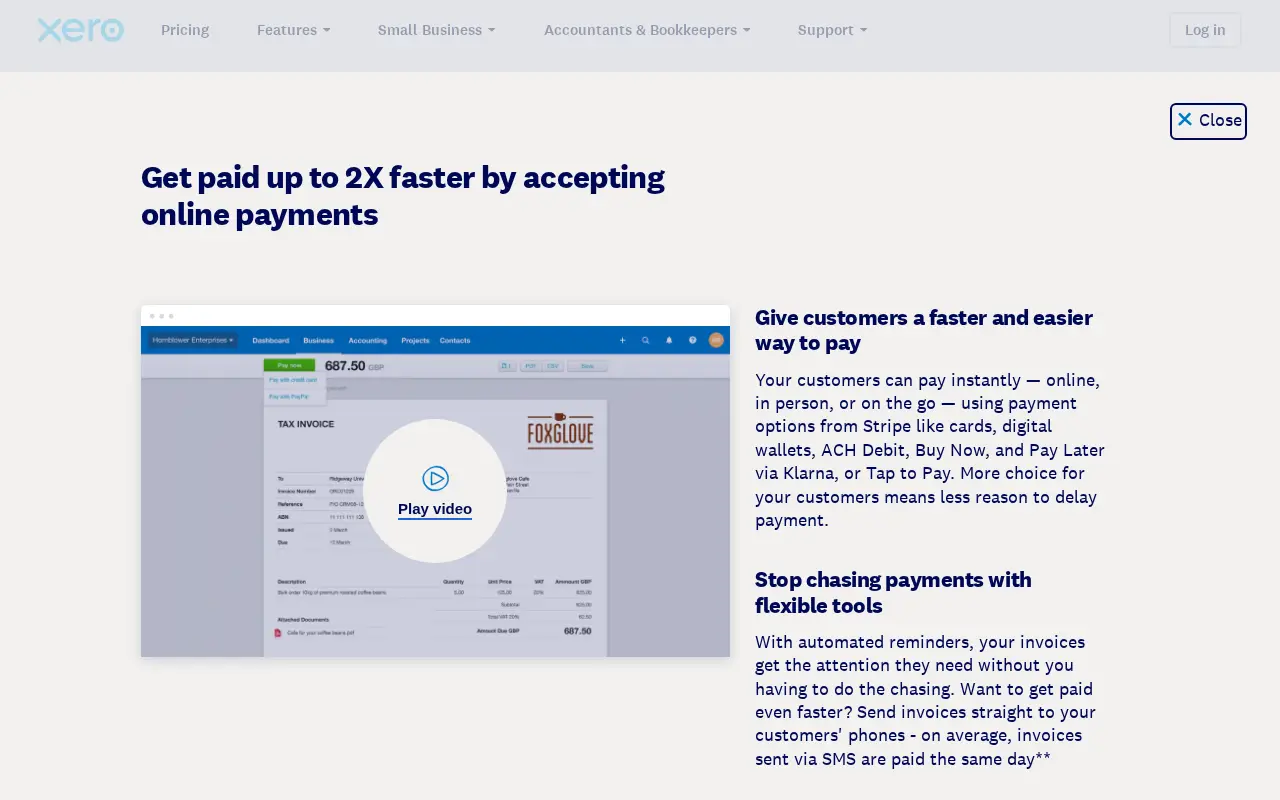
Xero Early shows $2.70 a month for the first 6 months.
Xero Growing shows $5.90 a month for the first 6 months.
The Established promo price was not readable on our check.
QuickBooks makes you choose 50% off or a 30 day trial. You cannot have both.
First year cost, worked out
Here is a simple cost model you can run yourself. It uses list prices only.
| Plan | Year one cost | Year two cost |
|---|---|---|
| QuickBooks Simple Start | $399 | $456 |
| QuickBooks Essentials | $892.50 | $1,020 |
| QuickBooks Plus | $1,470 | $1,680 |
| Xero Early | $178.20 | $324 |
| Xero Growing | $389.40 | $708 |
QuickBooks year one is 3 promo months plus 9 full months.
Xero year one is 6 promo months plus 6 full months.
Taxes and add ons are not included.
Users and access
This is the clearest difference between the two.
QuickBooks Simple Start allows 1 user.
Essentials allows 3, Plus allows 5 and Advanced allows 25.
Xero says every plan has unlimited users at no extra cost.
Editorial view: if five or more people need access, price Xero first.
Payroll
QuickBooks sells payroll and accounting together as Workforce bundles.
The entry bundle lists $88 a month plus $6.50 per employee.
It shows 50% off for 3 months as well.
Xero US payroll is an optional add on powered by Gusto.
Xero lists it at $36 a month plus $6 per person.
If you want one bill and one login, QuickBooks is simpler.
Invoicing and getting paid
Both send invoices and accept online payments.
QuickBooks Free allows only 2 invoices a month.
Paid QuickBooks plans remove that cap.
Xero includes invoicing on every plan.
Card processing fees for both were not part of this check. Treat them as UNKNOWN.
Bank reconciliation and automation
Both connect bank feeds and suggest matches.
QuickBooks Plus lists reconciliation help under Intuit Intelligence.
Xero highlights automated bank reconciliation on its compare page.
Per official docs, feed quality depends heavily on your bank.
Inventory and projects
QuickBooks Plus adds inventory tracking and project profitability.
Advanced adds deeper project financials.
Xero sells Inventory Plus as an optional add on.
For heavy inventory, look at QuickBooks Plus or a dedicated inventory app.
Reporting
QuickBooks Simple Start runs general reports like profit and loss.
Essentials runs enhanced reports. Plus runs comprehensive reports.
Advanced adds custom KPIs and Excel sync.
Xero includes real time reports on its plans.
Exact report counts per plan are UNKNOWN for both.
Integrations
Xero claims more than 1,000 app integrations.
QuickBooks also lists app integrations on paid plans.
Its Free plan does not include third party integrations, per Intuit.
Check that your bank, payroll and ecommerce apps are supported before you pick.
Accountants and bookkeepers
QuickBooks paid plans include access for 2 accountants. Advanced allows 3.
Many US bookkeepers work in QuickBooks every day.
Xero is popular with accountants too, especially outside the US.
Practical tip: ask your accountant before you choose. It saves real money at tax time.
Pros and cons
QuickBooks pros
- Free plan to start
- Payroll bundles in one login
- Inventory and projects on Plus
- Up to 25 users on Advanced
QuickBooks cons
- Higher list prices
- User caps on every plan
- Promo lasts only 3 months
Xero pros
- Unlimited users on every plan
- Lower list prices
- 6 month intro pricing
- 1000+ integrations, per Xero
Xero cons
- No free plan
- Payroll costs extra through Gusto
- Only three US plans
Which should you choose?
Pick QuickBooks if you run US payroll and want one vendor.
Pick QuickBooks if your accountant already works in it.
Pick Xero if many people need logins.
Pick Xero if your first year budget is very tight.
Switching between them
Both vendors publish switching pages.
Xero runs a QuickBooks alternative page with a switch offer.
Intuit runs a Xero comparison page. It did not load during our research check.
Plan your switch at the start of a quarter or fiscal year.
Ease of use
QuickBooks uses a left menu with many options.
New owners can feel lost in the first week.
Xero uses a simpler dashboard with fewer menus.
On documented features, Xero reads lighter and QuickBooks reads more complete.
Both offer mobile apps for invoices and receipts.
Pick the one your bookkeeper can drive fastest.
Multi currency and global use
Xero is widely used outside the US.
Its multi currency plan gate was not on the pages we read.
QuickBooks also supports multiple currencies on paid plans.
Xero includes multiple currencies on Established only. QuickBooks gates are UNKNOWN, since Intuit pages did not load.
If you invoice in several currencies, test both trials first.
Sales tax
QuickBooks calculates sales tax on its paid plans.
Xero lists sales tax as included on all three US plans.
Rules differ by state, so check with your accountant.
Neither tool replaces tax advice.
Customer support
QuickBooks offers chat and phone support on paid plans.
Intuit lists premium support on Advanced. Hours are UNKNOWN.
Xero says every plan includes free expert setup help.
Xero support runs through Xero Central online. Phone details were not listed.
Based on official docs, both help centers cover most daily questions.
Security and data ownership
Both are cloud tools. We did not audit their security claims.
You can export reports and lists from either tool.
Keep a yearly export of your books outside the software.
That habit protects you if you ever switch.
Scaling up
QuickBooks Advanced supports up to 25 users.
Beyond that, Intuit points to Intuit Enterprise Suite.
Xero keeps unlimited users but tops out at Established.
Fast growing firms may need an ERP like NetSuite later.
Our scoring
| Category | QuickBooks | Xero |
|---|---|---|
| Price | 3 of 5 | 4 of 5 |
| Users | 3 of 5 | 5 of 5 |
| Payroll | 5 of 5 | 3 of 5 |
| Reporting depth | 5 of 5 | 4 of 5 |
| Ease of use | 3 of 5 | 4 of 5 |
These scores are editorial opinion, based on official plan pages.
They are not lab test results.
A note on promo timing
QuickBooks promos last 3 months. Xero promos last 6 months.
So compare month 7 prices, not month 1 prices.
At month 7 you pay $38 against $27 at entry level.
Xero is cheaper at every matched tier from month 7 on.
A simple decision path
- Count the people who need logins. More than five points to Xero.
- Check who runs payroll. In house US payroll points to QuickBooks.
- Ask your accountant which tool they prefer.
- Price year one and year two with the tables above.
- Run a free trial of the finalist with one month of real data.
This path is documented in the official migration guides. Total time is UNKNOWN and depends on your data.
The worst choice is staying undecided while receipts pile up.
Who should skip both
Some businesses do not need either tool.
A freelancer with five clients may be fine with Wave Starter at $0.
A firm with several entities may need Sage Intacct or NetSuite.
A shop that lives in Square may want Square tools first.
Be honest about your size before you pay for depth you will not use.
A free tool with clean books beats a paid tool with messy ones.
Clean books matter more than the logo on the login screen.
Start small and upgrade when the pain is real.
Both vendors make upgrades easy.
Downgrades can be harder, so start lean.
That is the most useful takeaway from the documented facts.
Recheck prices before you commit.
Promos change often in this market.
How we researched this
We checked Xero’s official pricing page on 20 Oct 2026. Intuit pages did not load, so we relied on earlier official captures. We also reviewed the Google top 10 for QuickBooks vs Xero. Our hands on testing notes are still pending.
Both vendor price pages were opened on 20 October 2026.
We studied the four best ranked Google pages on QuickBooks vs Xero.
The tutorial mirrors Intuit’s own setup guidance.
Facts that would not load show as UNKNOWN.
Is Xero better than QuickBooks?
It depends on your team and your accountant. Xero wins on seats. Every Xero plan allows unlimited users, per Xero. QuickBooks caps users at 1, 3, 5 or 25 by plan.
QuickBooks wins on depth. Its Advanced tier adds more users and more reporting. It also bundles payroll through Workforce plans. Most US accountants also know QuickBooks well.
So ask one question first. How many people need to log in? If the answer is more than five, price out Xero first. If you need payroll and US tax help, start with QuickBooks.
Is Xero compatible with QuickBooks?
They are separate products. They do not sync with each other directly. You can still move data between them. Most firms export reports and lists, then import them into the new tool.
Plan the move around a clean cutoff date. The end of a month or quarter works best. Your accountant can then match opening balances in one step.
Can you move from QuickBooks to Xero, or back?
Yes, both ways. Xero says it helps QuickBooks users switch. Intuit pages did not load during our research check. So QuickBooks import details and any fees stay UNKNOWN.
Use this short checklist before any move.
- Pick a cutoff date at the end of a period.
- Export your chart of accounts, customers and vendors.
- Export open invoices and bills as of the cutoff.
- Run a trial balance and save it as a PDF.
- Import lists into the new tool first.
- Enter opening balances from the trial balance.
- Reconnect bank feeds and check the first month.
Feature by feature, at a glance
| Feature | QuickBooks Online | Xero (US) |
|---|---|---|
| Free plan | Yes, 1 user, 2 invoices a month | No |
| Users | 1, 3, 5 or 25 by plan | Unlimited, per Xero |
| Payroll | Workforce bundles from $88 plus $6.50 per employee | Gusto powered add on, $36 plus $6 per person |
| Accountant seats | 2 on most plans, 3 on Advanced | UNKNOWN |
| App integrations | UNKNOWN count | 1000+, per Xero |
| Intro offer | 50% off for 3 months, or 30 day trial | Promo price for 6 months on two plans |
Which business fits which tool
| Business type | Better fit | Reason |
|---|---|---|
| Solo freelancer on a budget | QuickBooks | Free plan covers very light use |
| Agency with many staff logins | Xero | Unlimited users on every plan |
| US firm running payroll | QuickBooks | Payroll bundles sit inside its plans |
| Firm already using Gusto | Xero | Its payroll add on is Gusto powered |
| Business planning fast growth | QuickBooks | Advanced adds seats and reporting |
Other options if neither fits
| Tool | Starting price (official page) | Best for |
|---|---|---|
| FreshBooks | Lite $23 a month | Freelancers who bill by project |
| Wave | Starter $0, Pro $19 | Very small businesses |
| Zoho Books | Standard $15 | Budget teams, free under $50K revenue |
| Odoo | Standard US$31.10 per user/mo yearly | An all in one suite |
We cover these tools in detail in our QuickBooks alternatives guide.
Hidden costs to check on both
- Promo prices end. Budget for the list price from month four or seven.
- Payroll is billed per person on both. Add your headcount.
- Extra apps may carry their own fees.
- Accountant time for a migration is billed separately.
- Sales tax rules vary by state. Check your filing needs.
What accountants tend to ask first
Your accountant will shape this choice more than any review. Ask them three things before you sign up.
- Which tool do you already use with most clients?
- Will you need your own login, and is it free?
- Can you file my sales tax from that tool?
Their answers often settle the debate. An accountant who knows one tool well saves you hours each month. That time is worth more than a small price gap.
Also ask how they handle year end. Some prefer to pull reports straight from the software. Others want an export in a set format. Agree on this before your first close.
A one minute decision rule
- Need many logins on a budget? Start a Xero trial.
- Need payroll and deep US support? Start with QuickBooks.
- Still unsure? Use both free trials on last month’s data.
How to use QuickBooks Online: a step by step tutorial
These steps follow the official QuickBooks Learn and Support center. Each step links to its source.
Step 1: Pick a plan or the trial
Open the official pricing page. Choose 50% off for 3 months, or a 30 day free trial. The page shows them as a toggle, so pick one.
Step 2: Create your account
Start from quickbooks.intuit.com. Then follow the Get started guide for setup.
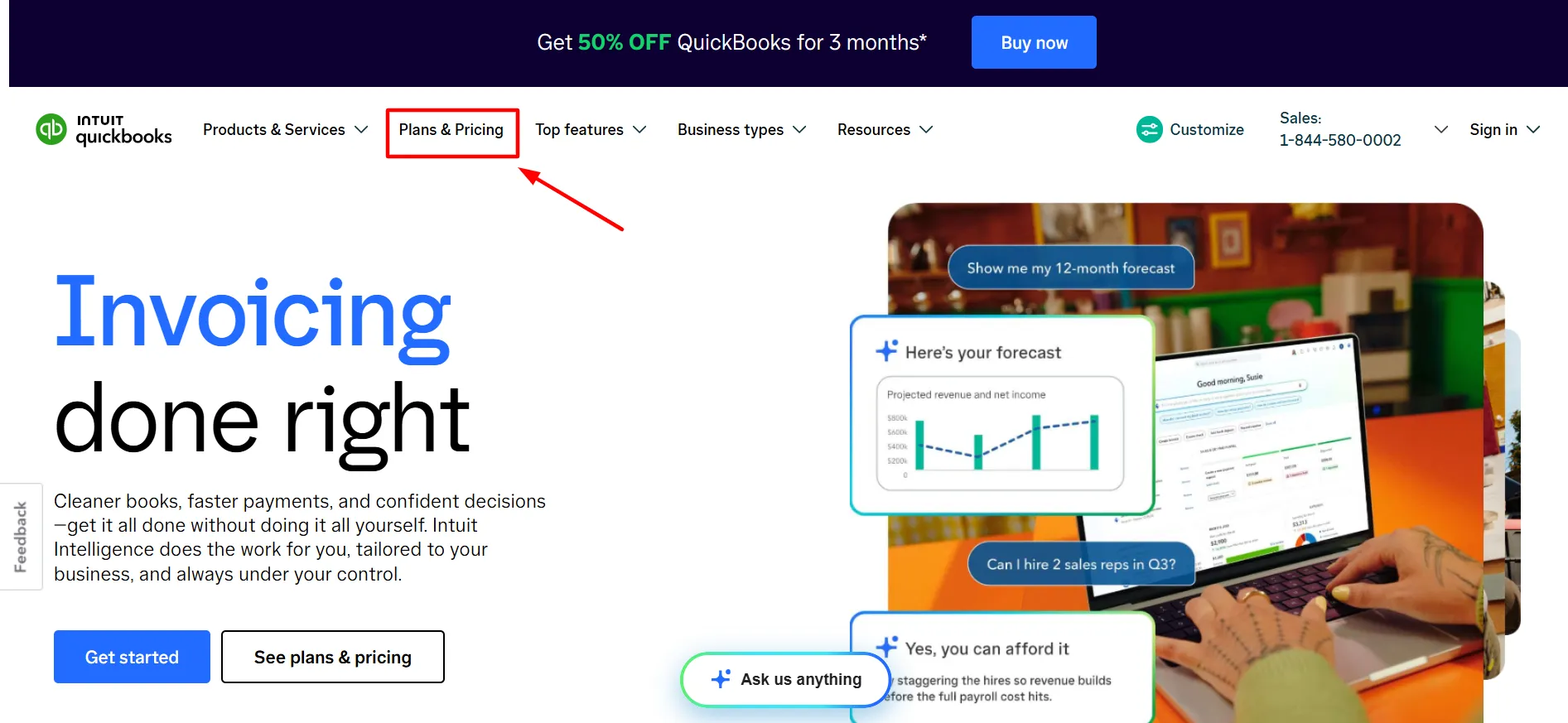
Step 3: Connect your bank
Go to All apps, then Accounting, then Bank transactions. Select Connect account. Search for your bank and sign in. See the bank connection article.
Step 4: Choose accounts and dates
Select the accounts to link. Pick a start date for downloads. Intuit says banks allow 90 days up to 24 months.
Step 5: Review and categorize
Open the Bank transactions tab. Review each download. Categorize it and add it to your books. Note that Free and Lite plans limit this feature.
Pros and cons at a glance
| Tool | Pros | Cons |
|---|---|---|
| QuickBooks Online | Free plan. Deep tiers up to 25 users. Payroll bundles. | Higher list prices. User caps on every plan. |
| Xero | Unlimited users. Sales tax included. Lower list prices. | No free plan. Payroll through Gusto costs extra. |
Honest negatives
- Both intro prices end, and the jump is large.
- QuickBooks caps seats by plan.
- Xero keeps multiple currencies for Established only.
Who should skip it
- Skip QuickBooks if many staff need logins on a small budget.
- Skip Xero if you want payroll inside one bill.
Renewal trap
QuickBooks discounts last 3 months, then list prices apply. Simple Start goes from $19 to $38. Xero Early goes from $2.70 to $27 after 6 months.
Scorecard out of 5
Each score is based on documented features and pricing only.
| Category | QuickBooks | Xero |
|---|---|---|
| Value | 3.5 | 4.0 |
| Features | 4.5 | 4.0 |
| Ease | 3.5 | 4.0 |
| Support | 4.0 | 3.5 |
Our take
QuickBooks stays our default for US firms that run payroll. Its tiers grow with you. Xero is the smarter buy when seat count drives cost. Check your accountant’s preference before you commit.
FAQ
Is Xero cheaper than QuickBooks?
Yes at list price. Xero Early is $27. QuickBooks Simple Start is $38.
Does Xero have unlimited users?
Yes. Xero says every plan includes unlimited users.
Does QuickBooks have a free plan?
Yes. It allows 1 user and 2 invoices a month.
Which is better for payroll?
QuickBooks bundles payroll. Xero adds payroll through Gusto.
Can I get both the QuickBooks trial and discount?
No. You choose either 50% off or the 30 day trial.
Which do accountants prefer?
Both are common. Many US accountants use QuickBooks daily.
When do the promos end?
QuickBooks after 3 months. Xero after 6 months.
Sources
- QuickBooks pricing
- Xero US pricing
- Xero vs QuickBooks (Xero)
- QuickBooks payroll pricing
- QuickBooks: connect bank and credit card accounts
- QuickBooks: get started
Promo prices end on fixed dates, so recheck both pricing pages before you buy. Ready to try it? Use this link See QuickBooks plans and pricing.

About the author: Roshan Jha
Roshan Jha is an SEO expert focused on helping brands grow through search-first content strategy, technical SEO, and data-driven digital marketing. He specializes in building scalable organic growth systems, covering keyword research, on-page optimization, topical authority, site audits, and conversion-focused content planning. With a practical, results-oriented approach, Roshan works with businesses to improve rankings, increase qualified traffic, and turn visibility into measurable revenue. Follow Roshan Jha on LinkedIn.